HEINI · Onboarding · one agreed workflow
Start with one workflow. Keep the business moving.
We define the first case and review sources, product data and responsibilities. HEINI brings its own applications; your ERP can stay. Authoritative records and permitted changes are agreed before adoption.
See HEINI on your own case See the example ↓SUSI guides sources, roles and approvals. Data quality, retained systems and the accepted first result determine the agreed introduction.
- ERP remains
- Proprietary import
- Odoo ready
- Roles and approvals
- First live case
Product preview · onboarding
Existing systems come with you.
SUSI guides company, connections, roles and rules in plain language. The proprietary import flow merges product sources and surfaces only uncertain cases for review.
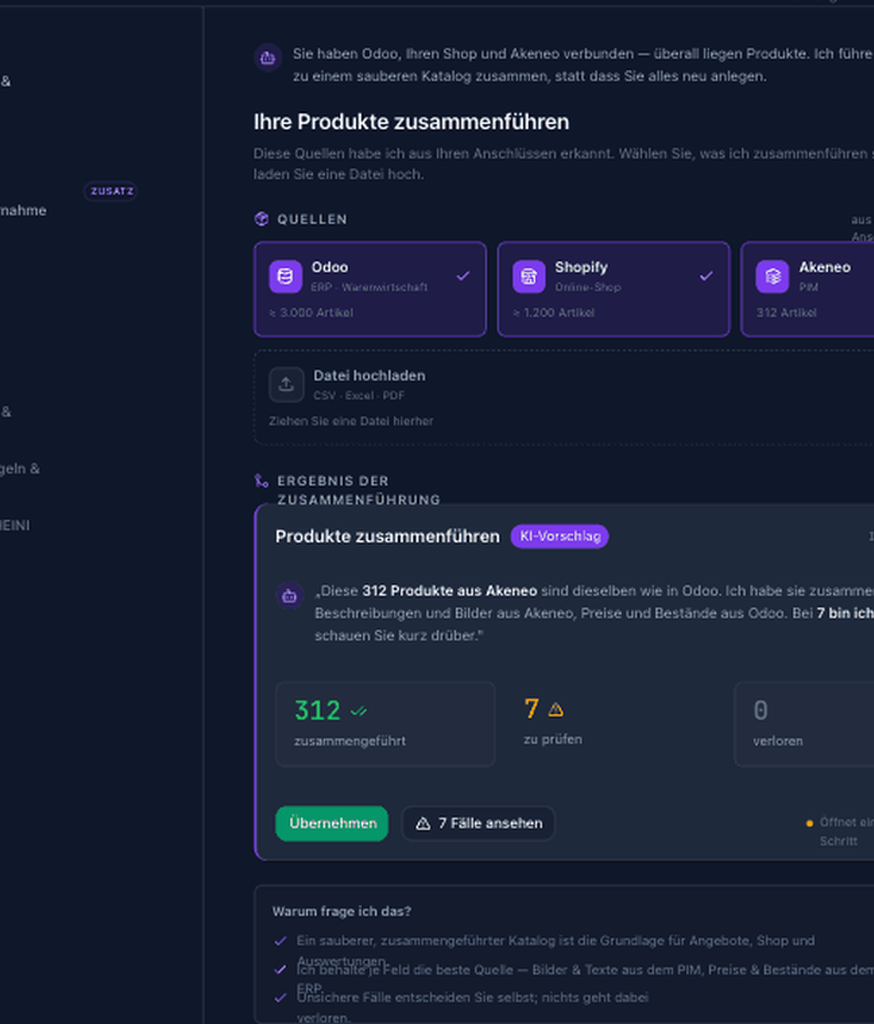
ERP, shop, PIM, email and product files already contain the business.
Nothing has been sent or changed yet.
- ERPMaster and transaction data
- Shop / PIMProducts, variants and media
- TeamRoles, language and approvals
Source conflicts and missing assignments remain visible for your decision.
Connections, colleagues and approval boundaries are configured.
Nothing has been sent or changed yet.
After import, see what was adopted.
Planned detail · reviewed and accepted together for your workflow.
- Adopted, held back, matching unresolved
- The import report should show counts and affected records for each outcome. You can check the mapping back to the original source.
- Resolve uncertain matches before approval
- Example: two sources describe the same product differently. Matching remains unresolved; the responsible person reviews source and destination before confirming adoption.
Agree this detailed scope and its plan assignment separately. The surrounding example is not evidence of activation or completed acceptance.
Opens a draft in the existing Bar. Nothing is sent until you send it.
What HEINI takes off your desk
What your first workflow needs
- 01
Keep the ERP
HEINI connects to the existing operating system; Odoo can be delivered preconfigured when no suitable ERP exists.
- 02
Merge instead of retype
The proprietary import flow groups product records and sends only ambiguous matches to review.
- 03
Set rules in plain language
Roles, thresholds and approvals are configured with SUSI, not buried in implementation workshops.
- 04
Start with one case
The first real operational case proves connections and responsibility before scope expands.
Explore the workflow and further possibilities
How the work moves forward
Nine guided steps
SUSI guides company, connections, roles and rules in plain language. The proprietary import flow merges product sources and surfaces only uncertain cases for review.
- 01
01 · Welcome & company
Company data, industry, team size — Susi sets the foundation.
- 02
02 · Connections
ERP, shop, accounting, email — OAuth or vault, with your approval.
- 03
03 · Team & roles
Directory sign-in, role mapping, seats — who sees and approves what.
- 04
04 · Merge products
Centerpiece: ERP, shop and PIM into one catalog — proprietary process. Susi merges, you only review uncertain cases.
What is already included
Every onboarding step
0101 · Welcome & company
Company data, industry, team size — Susi sets the foundation.
0202 · Connections
ERP, shop, accounting, email — OAuth or vault, with your approval.
0303 · Team & roles
Directory sign-in, role mapping, seats — who sees and approves what.
0404 · Merge products
Centerpiece: ERP, shop and PIM into one catalog — proprietary process. Susi merges, you only review uncertain cases.
0505 · Web presence
Shops, domains, sales advisor — when your setup needs it.
0606 · Brand voice & tone
Address and tone for all colleagues — set once, consistent everywhere.

Trust · human decision
Fast onboarding does not mean silent migration.
You review imports, assignments and rules before adoption. Data quality, existing connections and the first agreed workflow determine the setup effort.
- Import log
- Conflict review
- Role mapping
- Approval boundaries
- Only uncertain cases
- Source conflicts and missing assignments remain visible for your decision.
- Ready to start
- Connections, colleagues and approval boundaries are configured.
FAQ
Questions before connecting
Does my ERP need to be replaced?
No. Your existing ERP can stay. Together, we agree where product rules, prices, stock and postings are maintained and what HEINI may read or change. Odoo is a complementary ERP foundation. Replacing an ERP is a separate migration project.
What happens when information conflicts?
HEINI keeps the conflicting sources together for review. The responsible people decide which information applies to the specific case. The reviewed correction remains available with its source and permitted access for the next authorised task. Approval for one order does not automatically apply to all orders.
Do we have to replace our ERP?
No. HEINI connects to existing systems. For a new core, HEINI ERP from January 2027 and Odoo are options; migration and scope are agreed beforehand.
How long does onboarding take?
That depends on the first workflow, source data quality and existing connections. We review these together before agreeing a schedule.
What happens to conflicting product records?
HEINI groups likely matches, shows provenance and sends uncertain records to your review. Nothing is silently overwritten.
Your business. Your case.
Bring one system and one real case.
In 30 minutes, we show the connection path, the open questions and what a controlled first start looks like.